
API & webhooks
Push Heartbeat results into the systems your team already lives in, and pull your call data in as it is created.
Ways to automate
| Direction | Mechanism | Use it for |
|---|---|---|
| Out of the platform | Webhook URL | Reacting to processing events in your own tools — tickets, alerts, a warehouse load. |
| Into the platform | S3 event notifications | Hands-off ingest the moment a recording is written. |
| Into the platform | Bulk metadata upload | Attaching your CRM or dialer fields to calls so they become filterable. |
| Both | REST API | Deeper integration where a webhook and a spreadsheet aren’t enough. |
Setting up a webhook
- Open Preferences Sidebar › Account › Account › Preferences
- Enter your URL An HTTPS endpoint you control, reachable from the internet.
- Press Test The platform calls your endpoint and reports success or failure. A failure here is almost always a typo, a firewall, or an endpoint that doesn't answer a POST.
-
Save
Saving unlocks only after the test passes — a deliberate guard against a mistyped URL silently
swallowing every event.
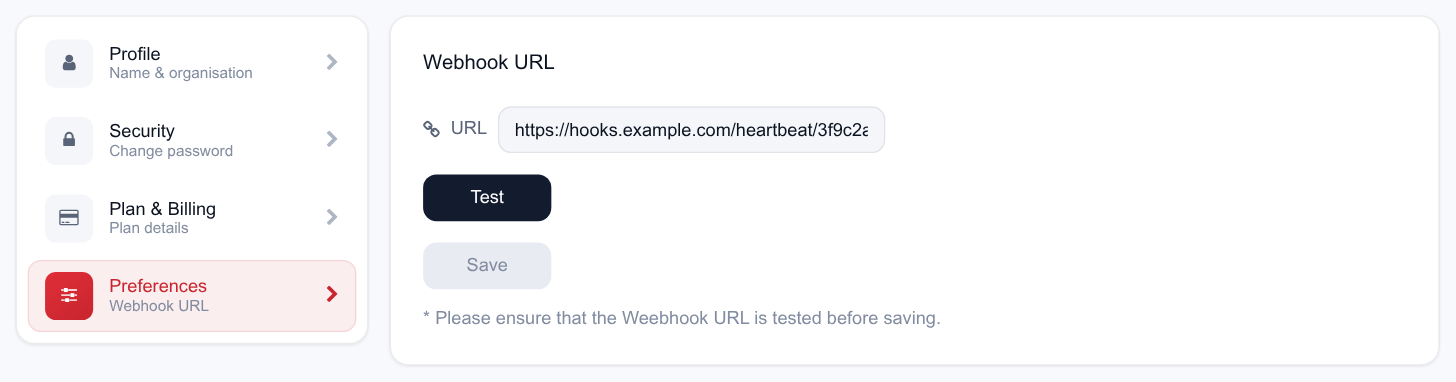
Save stays greyed out until Test succeeds — the reason the URL field and the two buttons are stacked in that order.
Updating preferences needs the configuration-update permission. If the save reports that you don't have permission, an admin has to make the change.
Building the endpoint
Whatever the payload, a webhook receiver that behaves well looks the same:
- Answer fast, work later. Acknowledge with a 2xx immediately and push the work onto a queue. Slow receivers look like failing receivers.
- Be idempotent. Key your processing on the call ID so a repeated delivery doesn’t duplicate a ticket.
- Accept unknown fields. Don’t hard-fail on payload additions.
- Log the raw body. A day of raw logs is worth a week of debugging.
- Serve valid TLS. Self-signed certificates will fail the test.
For the exact payload shape and event list for your account, ask us through the contact form — we’d rather give you the authoritative contract than have you build against a guess.
What teams do with it
- Escalate automatically A processed call with negative sentiment and a compliance flag opens a ticket in your service desk, assigned to the right supervisor.
- Alert on the floor Post the call ID and score into a supervisor channel so the coaching conversation happens the same day, not the next week.
- Feed your warehouse Land scores next to your CRM outcomes and you can ask whether call quality actually moves collection or conversion rates.
- Close the loop on ingest Reconcile what you sent against what completed, and alert when the two diverge.
Event-driven ingest
The closest thing to a zero-latency pipeline is the S3 integration: your bucket notifies the platform when an object is created, so a recording begins processing as it lands rather than waiting for a scan. Setup is a bucket policy plus an event notification, both described in Amazon S3.
The other sources are scheduled — every 4, 8, 12 or 24 hours — with an on-demand Run Now when you don’t want to wait.
Bulk metadata
Where a full API integration is more than you need, the metadata round-trip covers a surprising amount of ground:
- Export the call list from the dashboard to a spreadsheet — it carries the call IDs.
- Join your own fields onto those IDs from your CRM or dialer export.
- Upload the sheet back. The fields attach to the calls.
- Filter on them in the advanced filter builder, and save the filter for reuse.
Scheduled nightly, this gives you campaign-, queue- or disposition-aware QA without writing an integration.
API access
The platform is built on a documented REST API — the same one the application uses — covering authentication, call data and counts, agent and user administration, workspace configuration, chart configuration, ledger and plan data, upload URLs and comments.
API access is provisioned per account rather than self-served. To get set up:
- Tell us what you want to build Use the contact form to tell us the integration you have in mind.
- We issue credentials An authorization key is generated for your account, along with the endpoint reference for your environment.
- Build against the reference The reference is the authoritative contract — request shapes, responses and error codes — and is versioned per environment, which is exactly why we don't reproduce it here.
Keep API keys and source credentials in a secret manager, never in client-side code or a repository, and ask us to rotate them if one is exposed.
Reliability notes
- Processing is asynchronous. Ingest, transcription and scoring are separate stages; a call is only queryable once it has succeeded.
- Poll the status counts on Usage — Succeeded, Running, Queued, Failed — for a cheap pipeline health check.
- Handle failures explicitly. A failed call is listed with a reason and can be re-run; don’t assume every ingested call becomes a result.
- Minutes are finite. An automated backfill can consume a month’s balance in an afternoon. Check remaining duration first, and set processing limits before you point the platform at an archive.