Agent performance
Where a floor's calls become a per-agent picture: volume against goal, score, talk and silence, and emotion mix.
What this screen is for
Sidebar › Overview › Agents Performance is the coaching screen. The dashboard tells you what happened to your calls; this tells you what happened to your people — who is meeting their call goal, whose scores are slipping, and which specific skill each agent is missing.
It works two ways. With All Agents selected you get the floor: aggregate KPIs plus a league table. Pick a single agent and the whole screen narrows to them, including their skill-level detail and a printable scorecard.
Controls
- Agent selector — All Agents or one agent. Hidden for agents signed in to their own account, who only ever see themselves.
- From / To — the date range, then Apply Filter.
- Print — available when a single agent is selected; produces their scorecard.
- Everything is scoped to the workspace in the top-bar switcher.

The Five KPIs
| KPI | What it tells you |
|---|---|
| Total Calls | Volume in the range. Compare against the calls-per-day goal on the workspace. |
| Avg Duration | Mean call length. Read together with score before you treat it as good or bad. |
| Total Duration | Total minutes handled — the workload view, and what your plan usage tracks. |
| Avg % Talk | How much of the call the agent spoke. Very high is usually talking over customers; very low can be a passive agent. |
| Avg % Silence | Dead air. Persistent silence is usually a knowledge or tooling gap rather than an attitude problem. |

Sentiment, Emotion and Volume
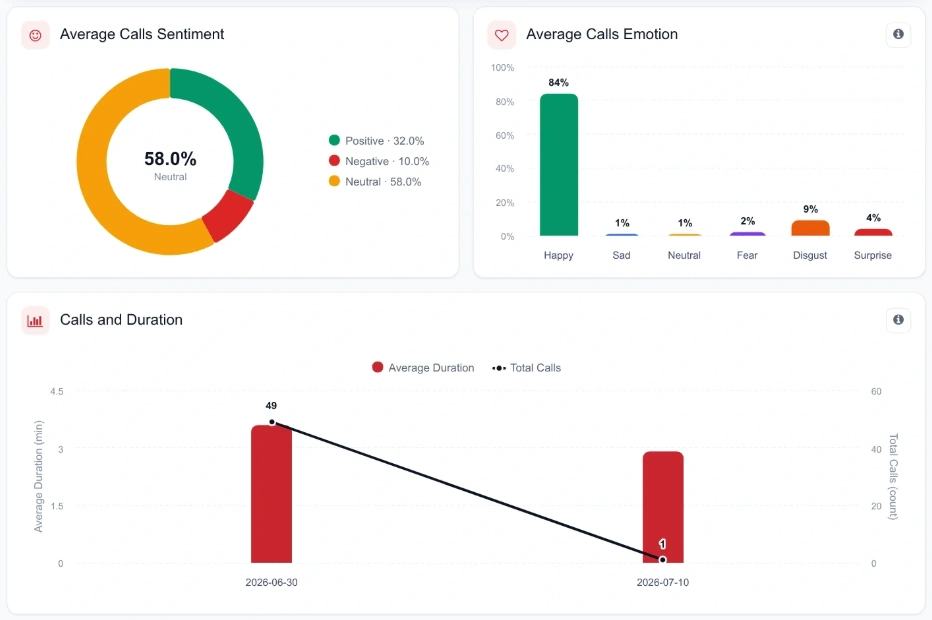
- Average Calls Sentiment The positive / neutral / negative mix across the selection, over the range.
- Average Calls Emotion Average distribution across happy, sad, neutral, fear, disgust and surprise — from the audio, so it catches tone the words hide.
- Calls and Duration Call count against duration in one view, which separates "more calls" from "longer calls" when total minutes move.
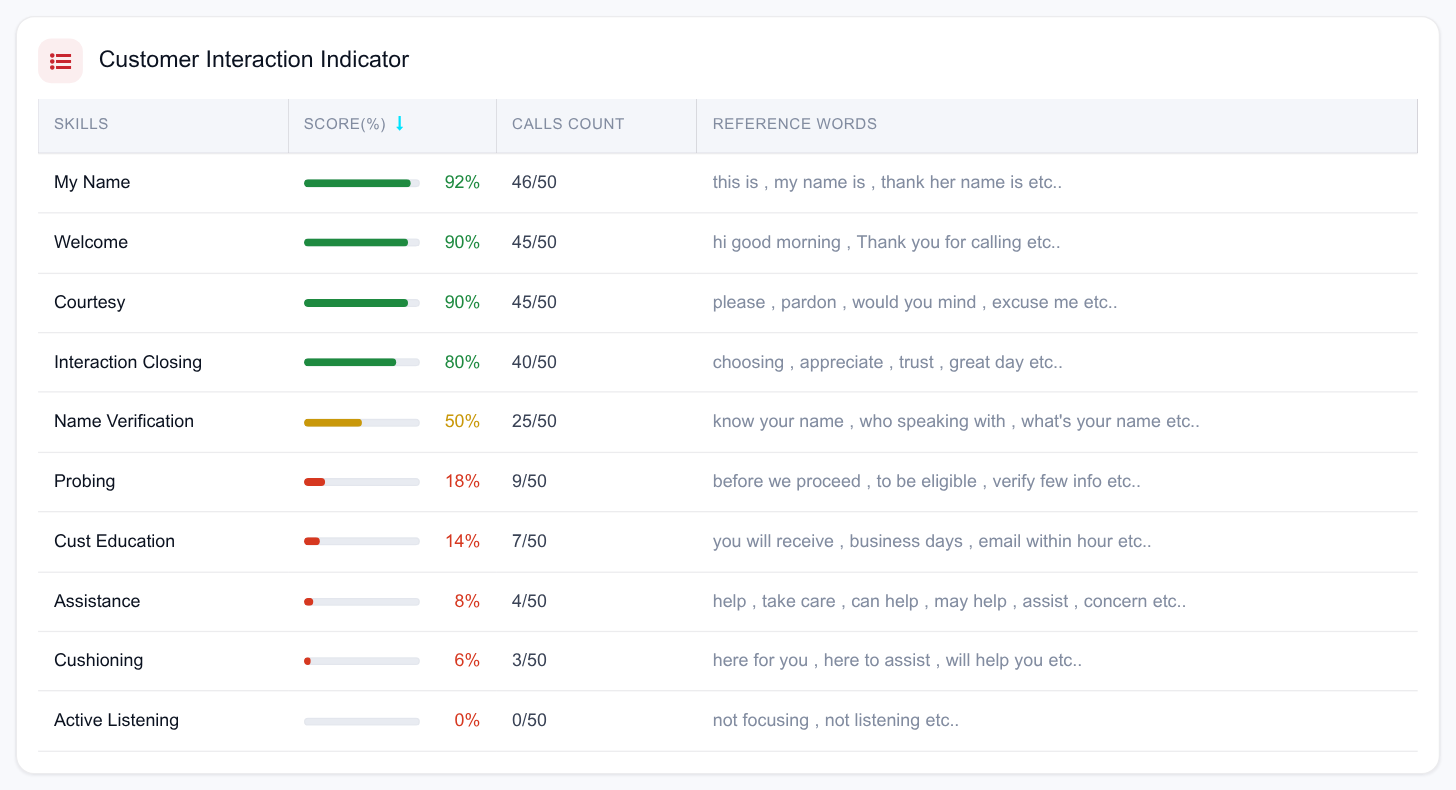
- Customer Interaction Indicator How consistently the soft-skill markers appeared across the selection — the aggregate form of the per-call checklist in Call analysis.
Parameter and Overall scores
Two gauge groups sit side by side:
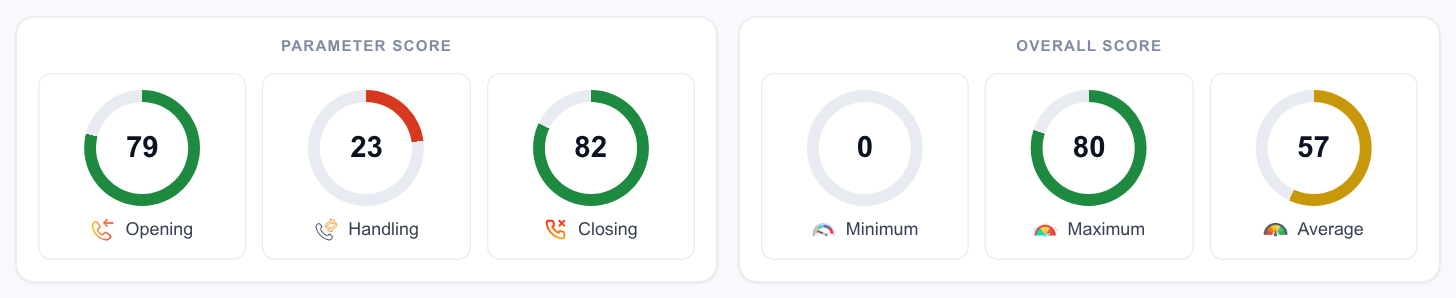
- Parameter Score — the opening, handling and closing stages, scored separately. This is where you see which stage of the call is weak.
- Overall Score — the combined score using your workspace’s weightage, with its own gauges for the range.
Because the weights are yours, the overall score is comparable across your own agents but not against another company’s. Change the weights in Goals & targets and every score recomputes on the same basis.
The agent league table
With All Agents selected, the table underneath lists every agent with:
| Column | Meaning |
|---|---|
| Agent | Name, with initials avatar. |
| Calls | Calls processed in the range. |
| Goal | Calls against target for the range — the target is your calls-per-day goal multiplied by the days in range — plus the percentage achieved. |
| Avg Score | Average call score as a bar. |
| Talk / Silence | Average talk and silence percentages side by side. |
Expanding a row opens that agent’s detail without leaving the table:
- total minutes handled, plus their minimum and maximum call score in the range — the spread matters as much as the average;
- Call Scores — opening, handling and closing;
- Skills — how often each soft-skill marker appeared across their calls;
- Sentiment — positive, negative, neutral shares;
- Emotion — their audio emotion mix.
Skills breakdown
With a single agent selected, the skills table lists every soft-skill marker with the score achieved, the number of calls it appeared in, and the reference words the platform listened for. Sorting by score puts the weakest skill at the top, which is the one piece of information a coaching session actually needs. Charts for call opening and handling round the view out.
Printing a scorecard
Print (single-agent view only) renders a clean, print-ready scorecard — no sidebar, no controls. Use it for one-to-ones, appraisal packs and evidence trails. Print to PDF to attach it to a ticket or a review record.
Running a coaching cycle
- Pick the window A week is the usual cadence; a month for appraisal.
- Scan the league table Sort your attention by low average score and by goal shortfall.
- Open the agent Expand their row, or select them, and find the weakest stage and skill.
- Get the evidence Go to the dashboard, filter to that agent and to negative sentiment, and open two or three calls. Coaching lands when it comes with audio.
- Print and discuss Take the scorecard into the session with the specific calls bookmarked.
- Re-check next week Same window, same agent. Movement in the weak skill is the only proof the coaching worked.